Bradford Council
Penalty notices for school absence
A one-page operational guide for Bradford schools: choose the correct route, provide the right evidence, respond promptly and submit requests through the portal.
Important: use the Penalty Notice Portal for poor-attendance and unauthorised-leave requests.
Do not use the old Word penalty-notice request form for these requests. The old form is retained only for the separate excluded-pupil process described later on this page.
TRAINING AND SUPPORT
Penalty Notice Portal training and guidance
Watch the latest portal refresher, view the accompanying slides and access the portal developer's guide.
Act on portal emails
An email headed “Fixed Penalty Notice Request – Additional Information Required” requires action. The request will not progress until the school logs into the portal, supplies the requested information
and resubmits the request.
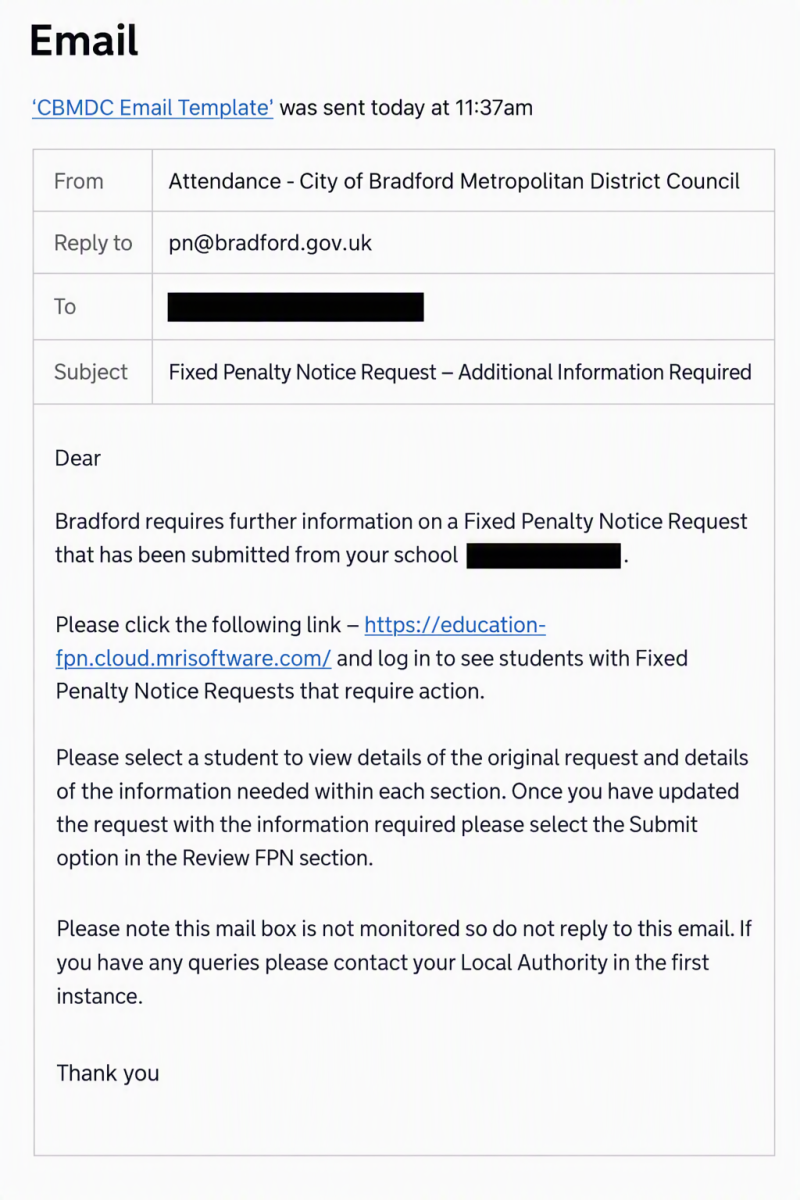
When this email arrives, open the portal and update the request. Do not reply to the automated email because the sending mailbox is not monitored.
- Open the link in the email and sign into the portal.
- Open the relevant pupil record.
- Read the information requested within each section.
- Correct the entry and upload only the requested evidence.
- Open the Review FPN section.
- Select Submit to return the updated request to Bradford Council.
Do not enter a blank response and do not assume that opening the request resubmits it. The request remains with the school until the update has been completed and the Submit option has been selected.
Before submitting any request
Final school check
- Select the correct request type.
- Check that the pupil is of compulsory school age for the relevant absence.
- Check the pupil's name, date of birth and school details.
- Include all relevant parents and check every name and address.
- Check house numbers and postcodes carefully.
- Complete the quantity-of-absence field, even where the portal describes it as optional.
- Count unauthorised sessions, not days.
- Check that the request dates match the attendance certificate.
- Upload a headteacher-signed and dated attendance certificate.
- Upload only the evidence required for the selected route.
- Use Additional Information to explain any discrepancy or unusual circumstance.
Choose the correct route
Route 1: Sporadic unauthorised absence
Use this route where the pupil has sporadic unauthorised absence and the case is suitable for the Notice to Improve and penalty-notice process.
Route 2: Unauthorised leave during term time
Use this route where a period of leave has been refused, or retrospectively identified as unauthorised leave, and coded as G in the register.
Route 3: Excluded pupil found in a public place
This is a separate process where a pupil is found unsupervised in a public place during school hours in the first five days of an exclusion without good reason.
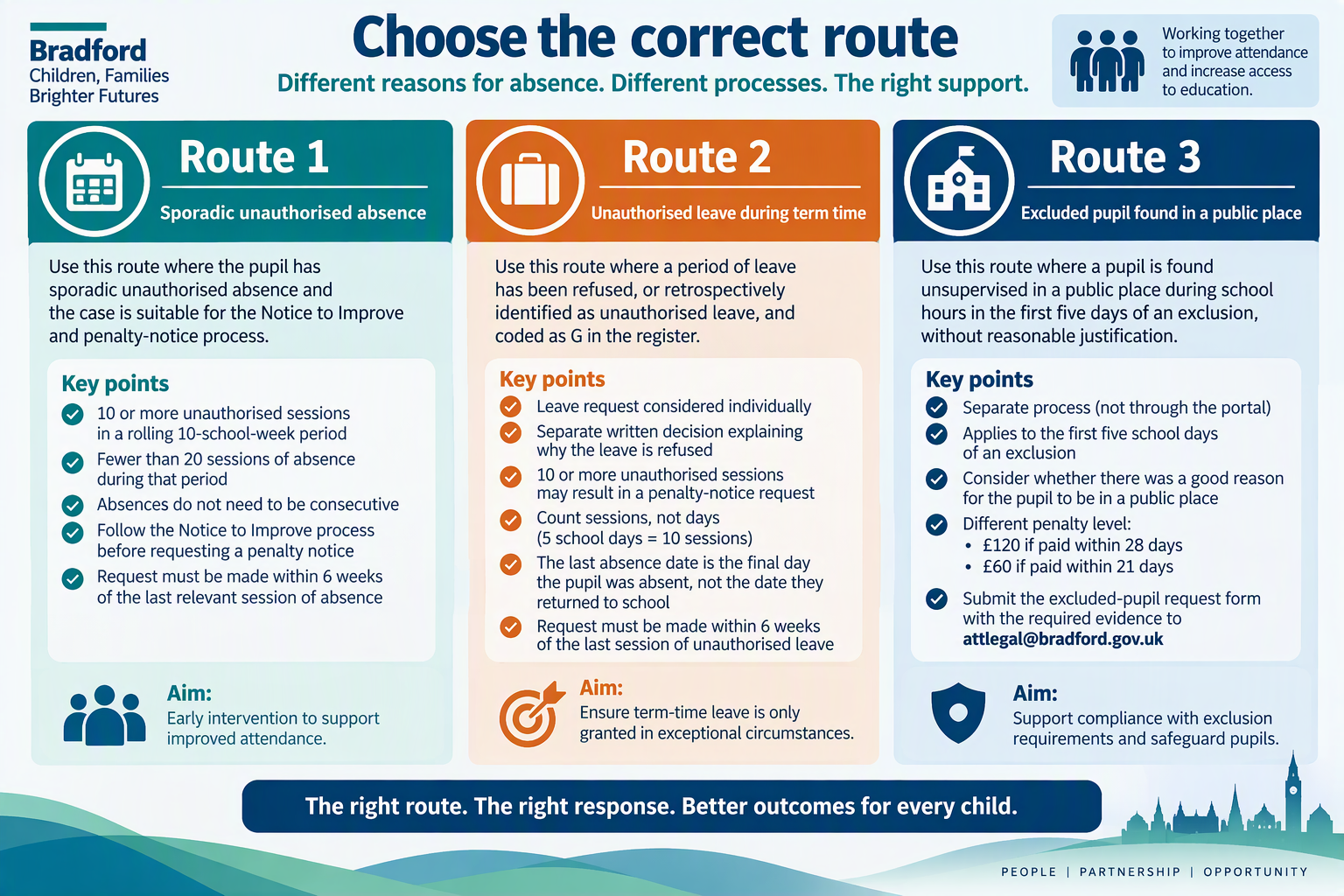
Choose the route that matches the reason for the proposed penalty notice. The required process and evidence differ for each route.
Penalty levels and repeat notices
Attendance offences
- First penalty: £160, reduced to £80 if paid within 21 days.
- Second penalty to the same parent for the same child within three years: £160, payable within 28 days with no discounted rate.
- Further offence within the three-year period: another penalty notice cannot normally be issued. Another intervention, including prosecution, must be considered.
The arrangements for an excluded pupil found in a public place are separate and are explained under Route 3.
REQUIREMENTS FOR PORTAL REQUESTS
Portal submission requirements for Routes 1 and 2
These requirements apply to both sporadic unauthorised-absence requests and unauthorised-leave requests submitted through the Penalty Notice Portal.
Parent details and addresses
Include every person who meets the legal definition of parent and may be liable. Where two parents are recorded, both should normally be included. Use Additional Information to explain why a parent
should not receive a notice, rather than omitting a parent without explanation.
Check before submitting
- Parent names are spelled correctly.
- House numbers are correct.
- Postcodes are correct.
- Each parent has been assigned the correct address.
- The portal address matches the evidence.
- Any difference is explained in Additional Information.
- All relevant parents have been selected.
Editing an existing parent
To change an existing parent's name or address, first select Include against the parent. The
Edit option will then become available. Edit the existing record rather than adding a duplicate parent.
INSERT_EDIT_PARENT_SCREENSHOT_HERE
Select Include before editing an existing parent's name or address. Do not create a duplicate parent record.
Attendance certificate checks
The certificate must:
- be signed and dated by the headteacher at the top;
- cover the correct period for the selected route;
- show correctly completed attendance codes;
- contain no unresolved N codes;
- show the correct number of unauthorised sessions;
- match the dates and pupil details entered in the portal;
- be explained in Additional Information if an address or other detail differs from the portal.
Complete the quantity-of-absence field in every portal request. Although the field may appear optional, Bradford requires this information for decision-making and any later legal process.
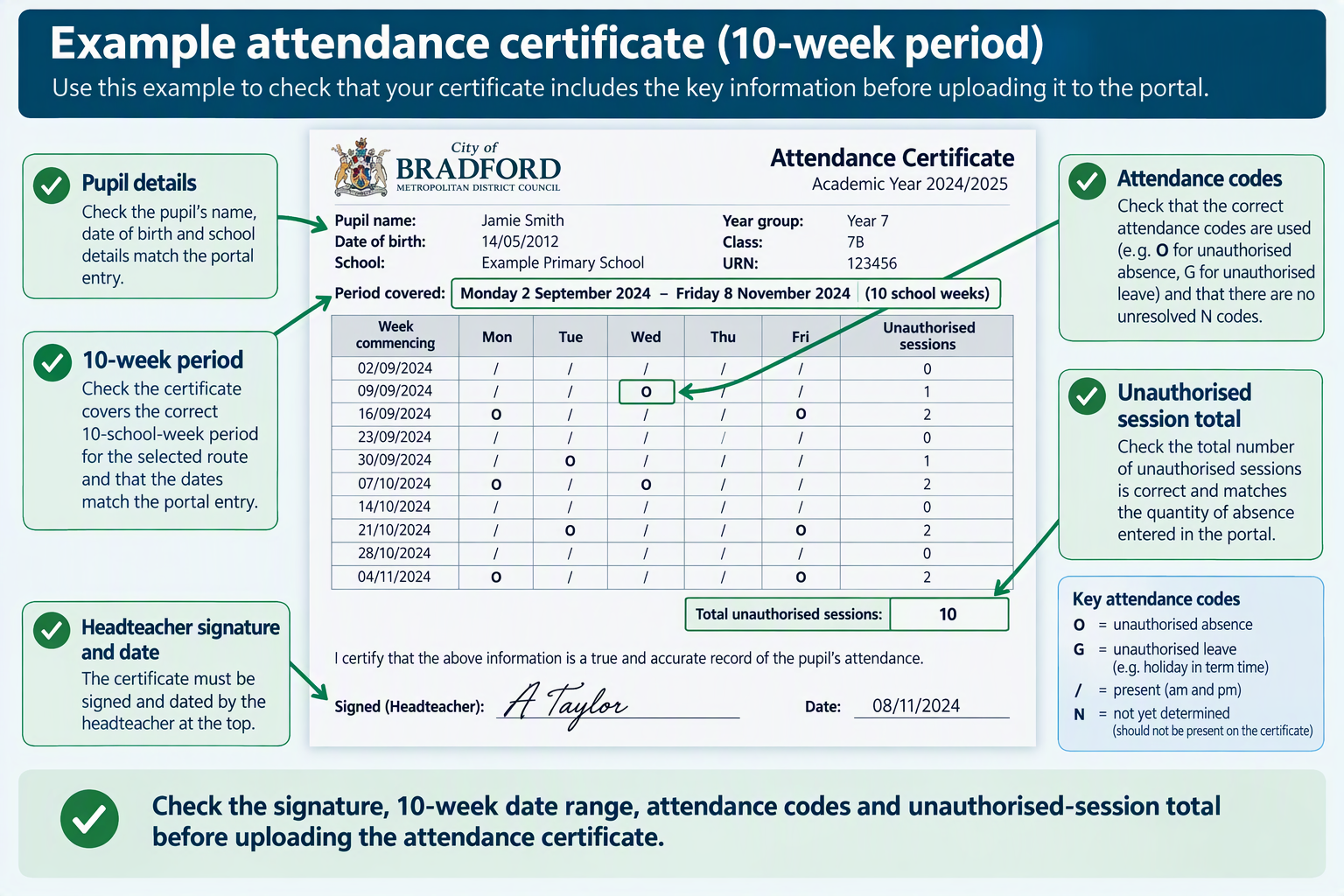
Check the signature, date range, attendance codes and unauthorised-session total before uploading the attendance certificate.
Common portal errors
Do not:
- use the old Word request form for ordinary portal requests;
- select the wrong request reason;
- count days instead of sessions;
- include the pupil's return date as an absence date;
- create a duplicate parent when updating details;
- omit a relevant parent without explanation;
- submit an unsigned attendance certificate;
- leave the quantity-of-absence field blank;
- ignore a further-information email;
- enter a blank response when further information is requested.
ROUTE 1
Sporadic unauthorised absence
Notice to Improve and penalty-notice process for sporadic unauthorised absence.
Bradford's early-intervention route: 10 or more unauthorised sessions in a rolling 10-school-week period, but fewer than 20 sessions of absence during that period.
Timing requirement: requests will not be considered where the request is made more than six weeks after the last relevant session of unauthorised absence.
Penalty-notice process
Step 1: identify and understand the concern
- Review attendance and the pattern of unauthorised absence.
- Contact the family and understand the reasons for absence.
- Offer appropriate school support.
- Record actions, engagement and impact.
- Use the current Bradford letter templates.
Step 2: invite the parent to an Attendance Support Meeting
The meeting must take place within the rolling 10-school-week period relied upon for the request.
Do not leave the meeting until the final day of the 10-week period. Arrange the meeting early enough to understand the barriers, offer support, agree actions and assess whether the plan has had an
impact.
Step 3: request a Notice to Improve through the portal
Where the threshold and Bradford's local criteria are met, submit a Request for a Notice to Improve through the Penalty Notice Portal.
Do not issue or upload the old school-created Notice to Improve template where the portal ate is displayed on the pupil's portal card, so the school does not need to open the full record to find it.
During the monitoring period, monitor:
- attendance and punctuality;
- any further unauthorised sessions;
- the family's engagement with the agreed support;
- progress against the Attendance Support Plan; and
- whether the support is improving the pupil's access to education.
If two or more unauthorised sessions are recorded during the monitoring period, the school may submit a new penalty-notice request through the portal.
Step 5: submit a new penalty-notice request if further unauthorised absence occurs
If the pupil records two or more unauthorised sessions during the four-week Notice to Improve monitoring period, the school may submit a new penalty-notice request through the portal.
The new penalty-notice request is streamlined. Select the correct parent or parents whose details were retained from the Notice to Improve request, rather than entering their details again.
Upload an updated attendance certificate signed and dated by the headteacher. The certificate must cover the original 10-school-week period and the complete four-week Notice to Improve monitoring
period. It must show the additional unauthorised sessions recorded during the monitoring period.
Do not upload the original Notice to Improve documents again. Bradford Council retains the documents submitted with the Notice to Improve request. Upload only the updated attendance certificate and
any new evidence specifically requested by the Penalty Notice Team.
Evidence for a Notice to Improve request
Upload only the evidence required for this stage:
- the current Attendance Support Meeting invite letter;
- a signed and dated attendance certificate covering the relevant rolling 10-school-week period;
- the quantity of unauthorised absence entered accurately in the portal; and
- relevant supporting evidence only where it helps explain the circumstances.
Do not upload the Attendance Support Plan, repeated copies of letters or the whole case file unless the Penalty Notice Team specifically asks for them.
Evidence for a penalty-notice request following an NTI
For the new, streamlined penalty-notice request:
- select the correct parent or parents whose details were retained from the Notice to Improve request;
- upload an updated attendance certificate signed and dated by the headteacher;
- ensure that the certificate covers the full original 10-school-week period and the complete four-week NTI monitoring period;
- ensure that the certificate shows the two or more additional unauthorised sessions recorded during the monitoring period; and
- upload any new evidence specifically requested by the Penalty Notice Team.
Do not upload the original NTI evidence again. The documents submitted with the Notice to Improve request are retained. The new penalty-notice request normally requires only the updated, signed attendance
certificate unless further evidence is requested.
Where attendance has improved but concern remains
Where the school has already held the Attendance Support Meeting and attendance has improved, but the child still records 10 or more unauthorised sessions within the rolling 10-school-week period, the school may still request a Notice to Improve.
Use Additional Information to explain:
- the improvement already seen;
- why concern remains;
- the support currently in place; and
- why a defined monitoring period is considered proportionate.
ROUTE 2
Unauthorised leave during term time
Process for refused or retrospectively identified unauthorised leave coded as G.
Threshold: a period of unauthorised leave reaching 10 sessions within a rolling 10-school-week period may result in a penalty-notice request.
Timing requirement: submit the request within six weeks of the last session of unauthorised leave.
Before the leave
- The parent submits a leave request, where one is made.
- The headteacher, or delegated person, considers the individual circumstances.
- The school sends a separate written decision setting out what was considered, why the leave is refused and the possible consequences if the leave is taken.
If leave is taken
- Record the unauthorised leave correctly using the appropriate attendance code.
- Check the number of unauthorised sessions.
- Check that the leave period entered in the portal matches the attendance certificate.
- Submit the request through the portal with the required evidence.
Count sessions, not days.
Five full school days usually equal 10 sessions. Count the G sessions shown on the attendance certificate rather than counting calendar days.
Do not include the return-to-school date as the final absence date.
The final absence date is the final date on which the pupil was absent. The portal dates and the attendance certificate must agree.
png" style="height:auto; max-width:1200px; width:100%" />
Count attendance sessions accurately and ensure that the dates entered in the portal match the signed attendance certificate.
Required evidence for unauthorised leave
- the parent's leave request, where one was made;
- the current refusal letter or retrospective refusal letter;
- a headteacher-signed and dated attendance certificate covering the leave period;
- relevant supporting evidence only.
Where the leave dates, address or family circumstances shown in the evidence do not match the portal entry, explain the reason in Additional Information. For example, explain where the pupil stayed with another parent or where a verified address changed
during the period.
Extended unauthorised leave
A continuous period of unauthorised leave lasting 20 school days or more may be escalated directly for prosecution rather than dealt with through a penalty notice.
A period spanning two half terms may still be treated as one continuous period. Submit the request through the portal when the pupil returns and clearly explain in Additional Information if the school is specifically
requesting consideration of a penalty notice.
ROUTE 3
Excluded pupil found in a public place
Separate process for the first five school days of an exclusion.
Separate penalty level: the penalty is £120 if paid within 28 days, reduced to £60 if paid within 21 days.
This separate route applies where a pupil is found unsupervised in a public place during school hours, without reasonable justification, during the first five days of an exclusion.
Consider whether there was a good reason for the pupil to be in a public place. This may include a medical appointment, youth justice appointment or an appointment with another statutory or voluntary
service.
Required evidence
- the current excluded-pupil penalty-notice request form;
- the exclusion letter explaining the parent's first-five-days responsibilities;
- an attendance certificate showing the exclusion;
- a detailed witness statement;
- supporting evidence, such as CCTV or other available evidence.
Email excluded-pupil requests to [email protected].
This route does not use the ordinary portal process. Follow the separate excluded-pupil request and evidence arrangements set out above.
Frequently asked questions
Do schools need to attach the old Word request form when using the portal?
No. The information entered in the portal replaces the old request form for poor-attendance and unauthorised-leave requests.
We have been using Stage 2 of the Staged Intervention Approach, the child's attendance has improved but there are still some unauthorised absence being recorded, can we request a penalty notice?
Yes. As long as the child's attendance has improved to meet the criteria (between 10 and 20 unauthorised absences in the last 10 weeks) and the Attendance Panel Meeting / Attendance Contract has taken place. In this situation please request a Notice to
Improve (NTI), attaching a copy of the attendance panel meeting invite letter, attendance contract, attendance certificate etc.
A document is missing or incorrect. Should the request be withdrawn?
No. Open the pupil record and use the Edit function while the request remains editable. If the notice has already been issued, contact
[email protected] and identify the pupil and year group. The team may return the request through the portal for further information.
When a request is declined, where can the school see the reason?
Open the pupil record and scroll to the list of previous requests. Expand the declined request to view the decision, the reason for declining it and the information relating to that request.
Who should be included as a parent?
Include everyone who may meet the legal definition of parent and explain the person's caring role in Additional Information. Where two parents are recorded, both should normally be included unless there is a clear reason why a notice should not be issued
to one parent.
A parent disputes the notice. What should the school do?
There is no statutory right of appeal against a penalty notice. However, where the parent provides evidence that may affect the school's decision to code the absence as unauthorised, the headteacher or delegated decision-maker should reconsider the evidence.
If the school changes the coding decision, notify Bradford Council through the portal.
The parent wants to contact the Penalty Notice Team.
Direct parents to
bradford.gov.uk/schoolpenaltynotices. Do not provide internal team telephone numbers or email addresses intended for school use.
Downloads and templates
Use the current templates without rewriting the standard legal wording. Complete only the sections intended for school-specific information.
Page owner: John Leese, Attendance Lead
School and portal enquiries:
[email protected]
Parent contact route:
bradford.gov.uk/schoolpenaltynotices
Review status: Updated to reflect current portal practice, Notice to Improve arrangements, the latest portal training resources and recurring submission issues identified by the Penalty Notice Team.