We've been busy reviewing all our policy and procedure areas, and considering how we can help schools, ourselves, and our families, when it comes to school attendance.
One idea we have had was to create a city-wide leave of absence request forms for parents to complete. We are aware that there is a historic word version floating around the inter-web, which we still see from time to time, which I think was last updated
in 2013? Technology has moved on somewhat since then, and we are introducing an e-form for parents to complete. The idea is that parents can complete one form via the council website for all children, regardless of the school they attend, and the completed
form will be sent back to the parent, as well as being automatically forwarded on to each school for their consideration. Schools can then decide whether to approve or reject the request, which triggers an email to the parent letting them know the outcome,
and where the request is rejected, the consequences of taking an unauthorised leave of absence.
The aim of this is to ease the administrative burden on schools from having to process these requests, its easier for parents as they only need complete one request form for their family, and the council can be entirely confident that every school in Bradford
is communicating with parents in a legally compliant way.
The form looks / works something like this (NB if you are struggling to see the images, right click on them and select "open image in another tab")
- The “lead” parent will click on a link, which takes them to the first screen, which help outlines the process and the consequences.
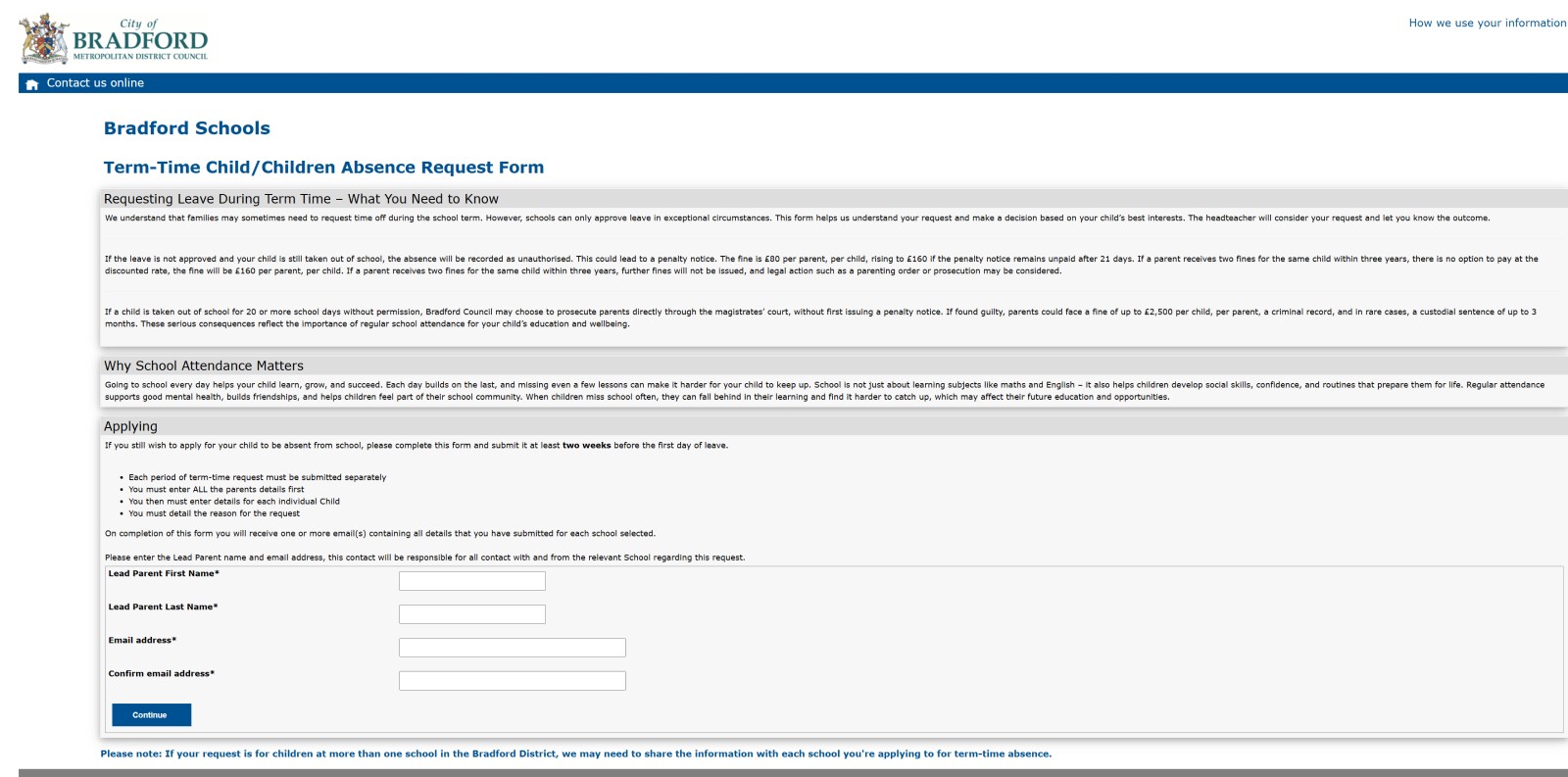
- The next screens ask for the lead parent’s details, any other parents, together with child details, and details about the leave, and then the lead parent submits form. When submit is pressed, parent sees this final screen:
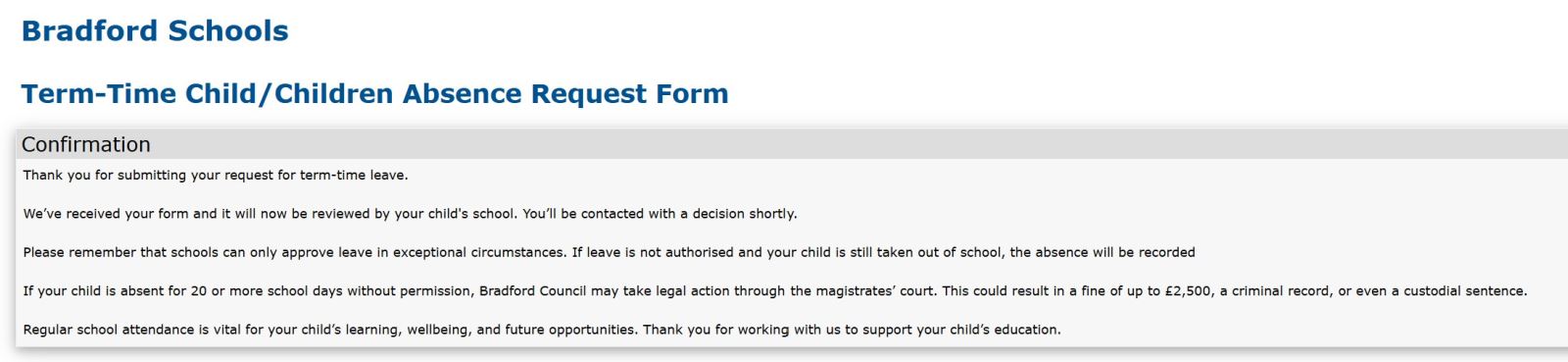
-
The Lead parent then gets a copy of what they have submitted entitled: “Term-Time Child/children Absence Request - see an example
here.
-
As a School you receive an email entitled: “Term-Time Child/children Absence Request Submission” – see an example
here. You will receive a link which takes you to a webpage to review the submission and decide whether to approve or refuse the request. Screenshot of this page is below.
IMPORTANT - You will be asked for a 4 digit PIN after following the link. The 4 digit number is the last part of your school's DfE Number (i.e. if your school's DfE number is 380/9999, your 4 digit PIN would be 9999).
.jpg)
- The school can then approve or reject the request – you can also see (at the bottom of the screen), where the request includes other children and other schools, to help you communicate with schools where you are not sure whether or not to authorise an absence.
You can also see if the other school has already authorised the absence.
- If the school authorises the absence, parent is sent an email detailing this – See an example
here.
- If the school rejects the request, school gets the opportunity to provide the reasons why:
.jpg)
- Parent also gets sent an email detailing this, using with the wording found within our standard letters – there is no need to send out a separate letter – An example is
here . The school is also emailed a copy of the outcome for your records.
- We have set up a weekly email reminder, sent every Monday morning, that will ask schools to check their current list of requests awaiting approval. The email contains a link to a webpage that has all requests listed, both those approved and those waiting
to be approved. The webpage will look something like this: (This is in the test environment by the way, please don't panic that parents are submitting requests already!)
- REMEMBER - You will be asked for a 4 digit PIN after following the link. The 4 digit number is the last part of your school's DfE Number (i.e. if your school's DfE number is 380/9999, your 4 digit PIN would be 9999).
.png)
- When you click on view, this will take you to the request, as you would see if you'd clicked to view the request when receiving the initial request via email.
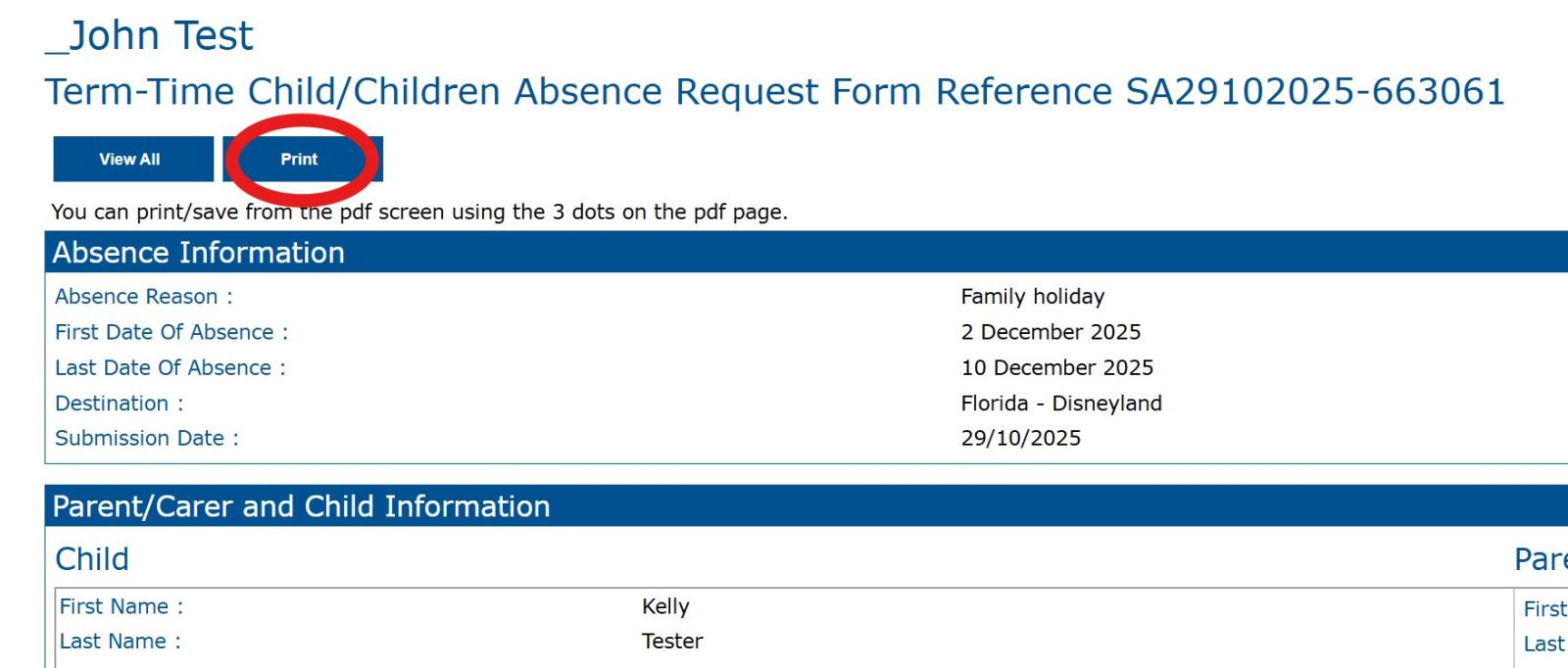
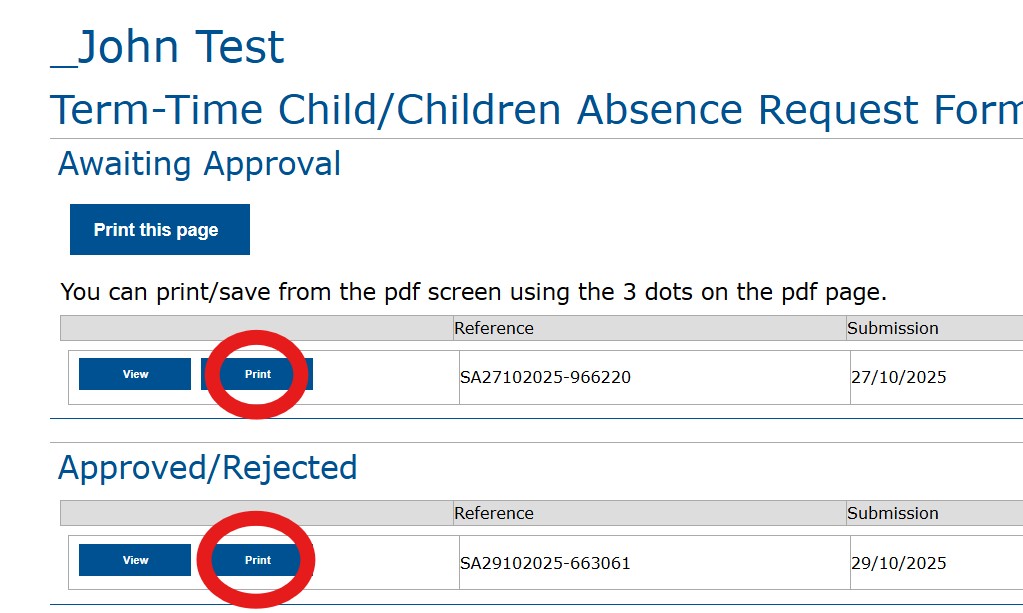
- You can also save a copy of the LOA request by clicking "print" either on the page that lists all the submissions your school has received, or when reviewing an individual request. This is helpful because you can save a copy on the child's record, as well
as attaching a copy to the penalty notice request via the PN portal should you decide to submit a request. Screenshots showing the print button are below:
Implementing the Leave of Absence E-Form in your school
How each school decides to implement the new form is a decision for each school individually. There are no plans currently to publicise the e-form via the council website, however the council will host the e-form.
A QR code for the e-form is below - you can download it by right clicking on the code and selecting "Save image as..."

We would advise schools to add the link to any pages on your school website which refer to leave of absence requests or attendance. We would also suggest that the link is shared with parents via any newsletters or other types of regular communication parents
are sent. You can also include the QR code in any letters you may issue to parents, or via a poster displayed in the reception area.
Frequently Asked Questions
We have shared the development of the LOA E-Form with the Bradford School Attendance Focus Group, who have contributed the following questions:
I am wondering if we are able to authorise part of the absence. For instance, we had a number of cases last year when the child went abroad for medical/dental treatment. We followed the advice to authorise the days for the treatment where we
had medical evidence but not the whole leave.
Good question. So yes definitely as a school you can do this.
I would advise pressing approve or reject based on a) how will the majority of the absence be categorised and b) whether or not you still intend to request a penalty notice. If the answer to a) is unauthorised absence and/or b) is yes, I would suggest rejecting
the request so that the parent is aware of the consequences - it may be that school then issues a follow up letter clarifying that some of the absence will be authorised.
How long is it between a parent filling the form in and school being notified?
Schools are notified automatically and instaneously as soon as a parent presses submit. Whilst we have set the form up for schools to use, the council are not involved in the process whatsoever, this is a process managed by schools, with notifications sent
to the parent once a request is approved/rejected.
My only issue would be that it's a lot for parents to fill in-what if they don't give the names of the other parent?
The form is not linked to the PN portal, it sits separately, so schools can still send letters to other parents if you feel that not all parents have been named. The automatic email notification to those parents who have added an email will see that the
same decision applies to all parents of the child.
Is that up to us as a school to complete this?
No, this is a form for parents to complete only. This is not a form for schools to complete.
How does this fit with the fines process?
This is a form purely for parents to complete and submit. As a school/trust you still employ your own procedures, so some schools may wish to meet with the parent before approving/rejecting a request, some schools may wish to speak to the other sibling's
school (remember, this is one form for a whole family) to discuss what to do before approving/rejecting a request. As I mentioned, this is separate to the PN Portal, so you can still reject a request, unauthorise the absence, but then you may decide not to
request a PN when considering the situation further.
I assume this is just information gathering and we would submit fines through the portal in the usual way due to the evidence needed?
This is correct, yes. As you get a copy of the form the parent submits emailed to you, you can then attach this to the PN request, which may help save time too.
Will this link to the portal as in it will populate it for us or not?
No, this is separate, but because you receive the form in a pdf format, you should be able to copy and paste text from the form straight into the portal (i.e parent's names).
In principle I think it is the right thing to do but what processes will be put in place for those who are unable to file the online forms in, either due to language barriers or internet access and also those who still just will not complete
a form.
Thank you for taking the time to have a look and for providing feedback. Probably the easiest solution would be to direct parents to visit their children's school or a local library to complete the form if unable to complete the form online at home / by
themselves. Most webpages have a translation function that they could use too to help with language barriers. There are also parents who will just go away and not complete a form, and whilst the online form may make it a bit easier for some parents, there's
not much we can do to force parents to complete one, therefore the usual sanctions / safeguarding approach should still be utilised.
The current - very old form - does have a section to fill in about a meeting to discuss the absence having taken place. Will this still be required? If so, how will it be recorded?
I think this is a really good idea, but from our point of view we think that this should be for individual schools to decide, but the standard response does invite parents to arrange to meet with schools if they wish. I'm also conscious that with the amount
of term time leave requests schools have to deal with, a meeting for every one might be too many, but is important for those higher risk trips where there may be an element of a safeguarding concern i.e. trips to countries where FGM / forced marriage is prevalent
and where the child's profile (age, cultural background, gender etc) suggests they may be at a higher risk.
Any further questions...
Please contact the team via
[email protected]